
Enterprise Multi-Agent Platform

AgentQ

Specialist agents handle documents, speech and data, passing results on to a reviewable document and plan.

Overview

One request, passed between specialists, finished as a deliverable

Ask through the portal and the right agents work through documents, knowledge and data in sequence — a workflow you can run again and again.
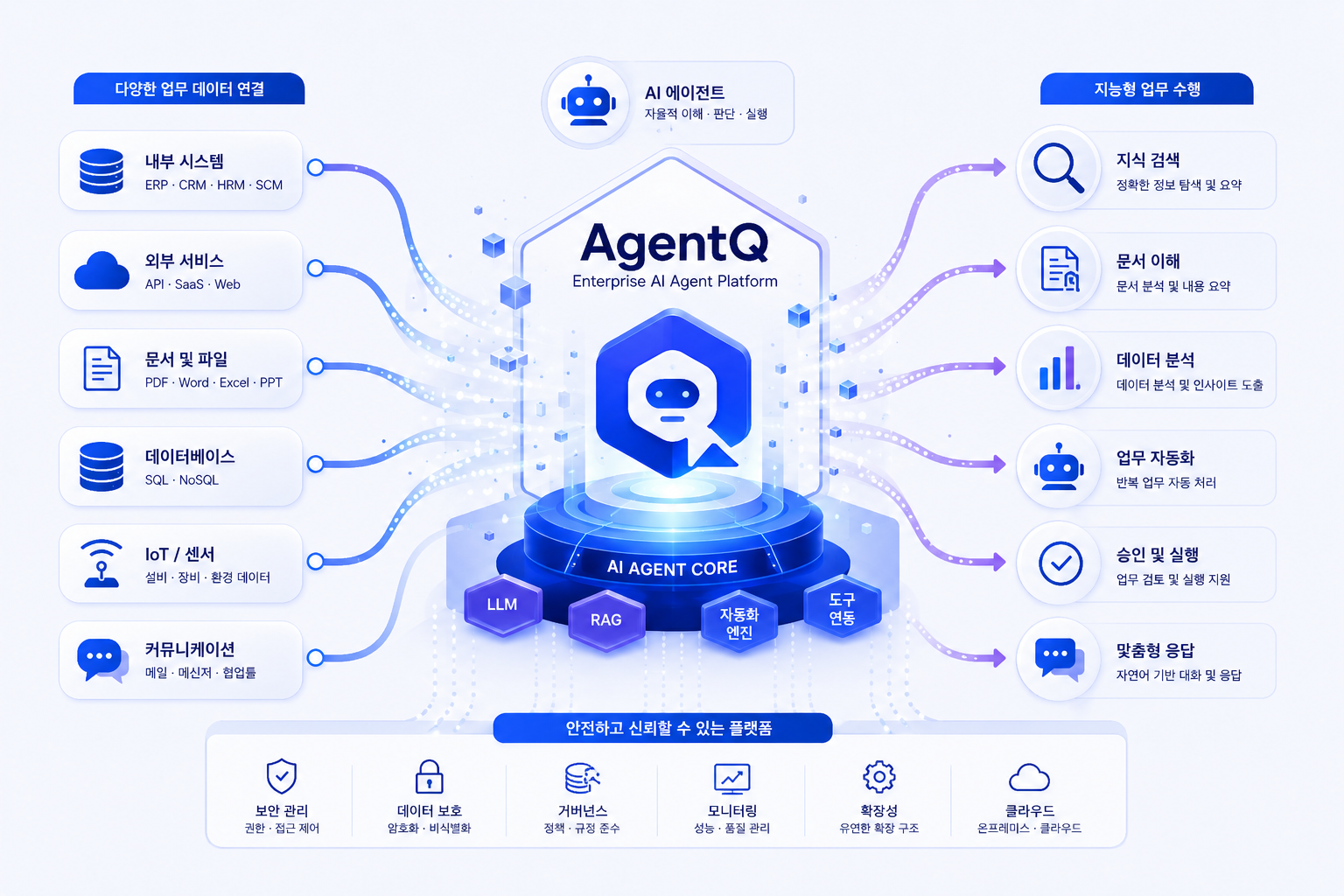
AgentQ가 문서·데이터베이스·업무 시스템을 연결해 지식검색·문서이해·데이터분석·보고 업무를 처리하는 구조
A hub of specialist agentsKnowledge search, OCR, database queries, analysis, translation, reports, policy review — each in one place
Orchestration across agentsEach step’s result passes to the next agent, carrying multi-stage work through to the end
Evidence and security throughoutDRM and OCR preparation, cited sources, permissions and classification, and a final check — all part of the flow
Something you can reviewNot just an answer — reports, minutes, review notes and analyses you actually use
Features

The right specialist for each piece of work

Knowledge search, drafting, transcription, policy review, data queries and secure chat — on one platform.

RAG Knowledge Search

Knowledge search with evidence

Search internal documents and policies in plain language, and see the evidence and sources behind the answer.
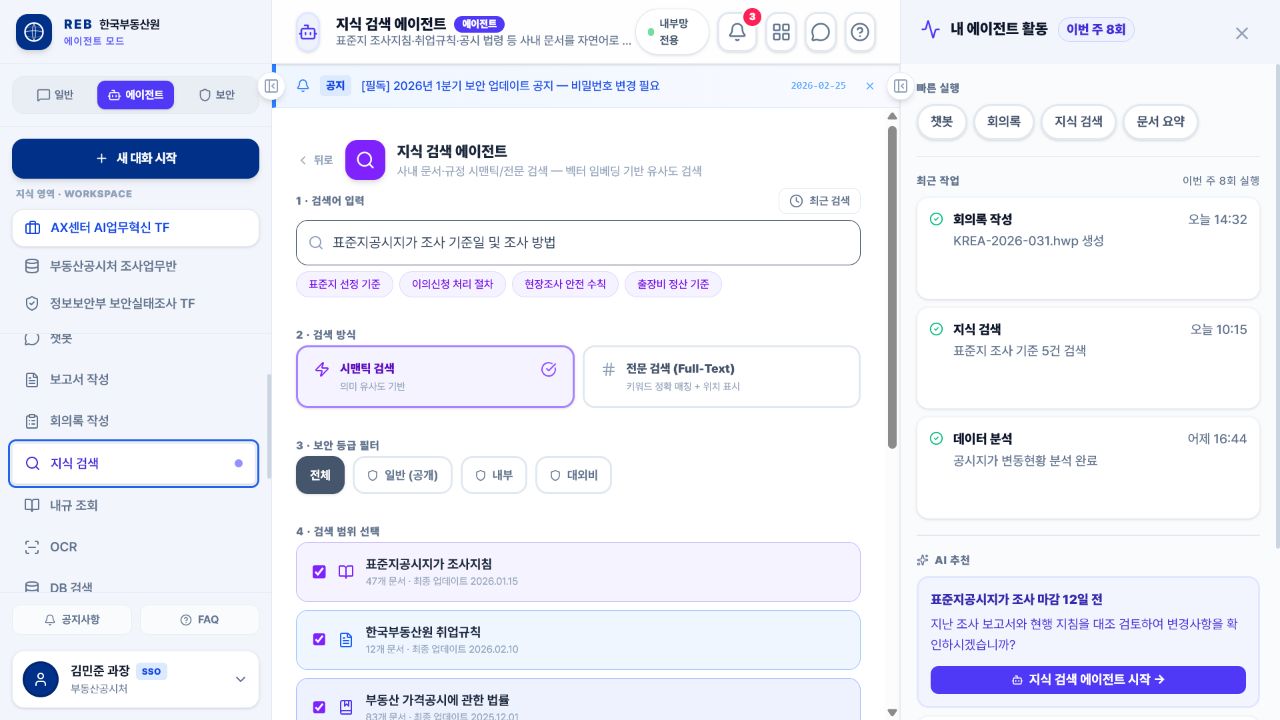
  • Search by meaning Finds documents and clauses that mean the same thing, however they are worded
  • Evidence shown The answer comes with where it came from and what else is relevant
  • Scope respected Only material within your remit and clearance is searched
AgentQ 지식 검색 에이전트에서 검색 방식과 문서 범위를 선택하는 화면
Standard Report

Reports in your own format

Give it the essentials and it drafts the report in your organisation’s format, ready to review.
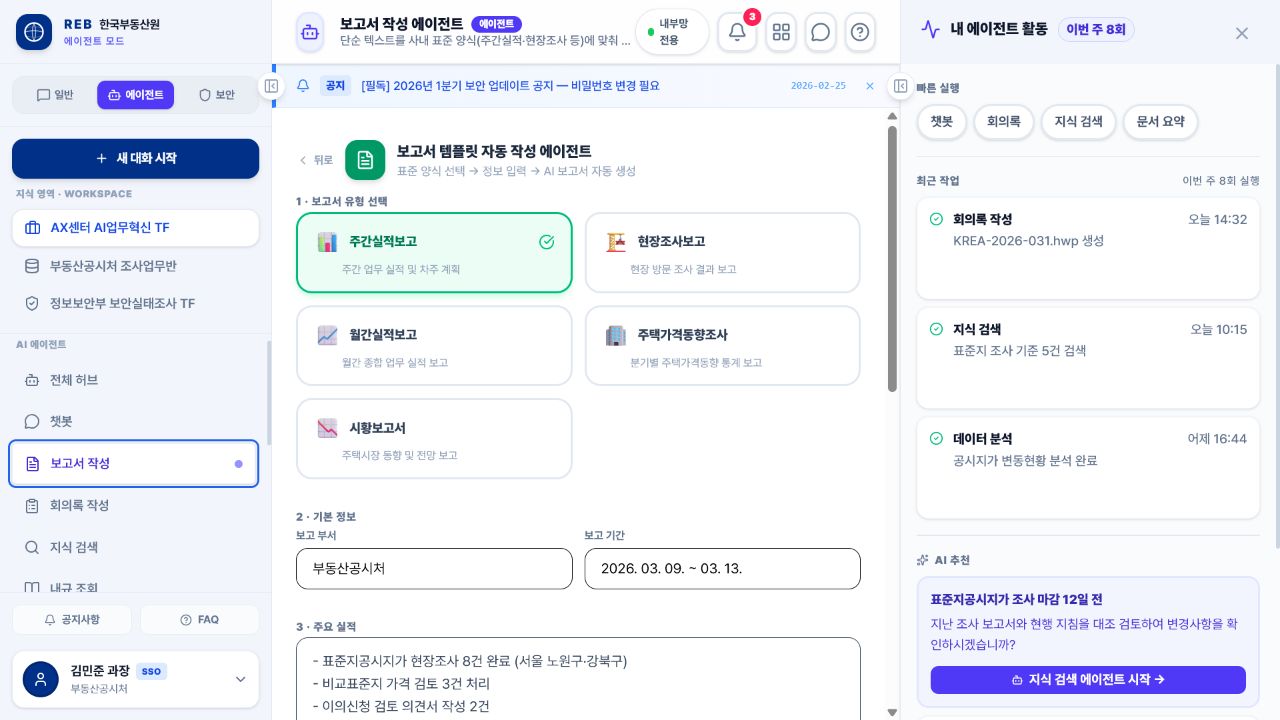
  • Choosing the format Standard templates for weekly results, research notes, market summaries and more
  • Filled in automatically Results, dates and plans placed under the right headings
  • Reviewing the draft Check it, edit it, then use it as the official document
AgentQ 보고서 작성 에이전트에서 보고서 유형과 기본 정보를 입력하는 화면
Meeting Intelligence

Minutes from the recording

Upload the recording and the handouts; it separates who said what and writes up the discussion and the follow-up.
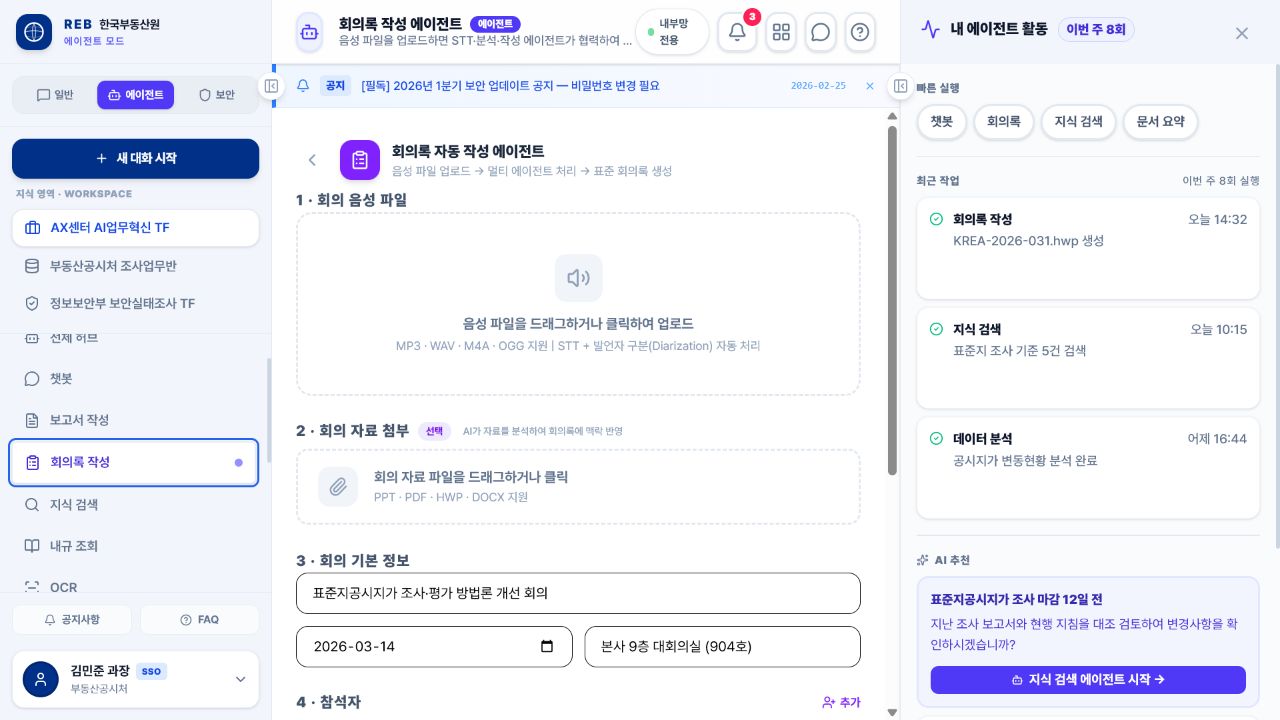
  • Speech recognition Transcription with speaker separation turns each contribution into text
  • Summary Agenda, decisions, owners and dates, sorted out
  • Finished minutes Written into your standard minutes template, with the attachments taken into account
AgentQ 회의록 작성 에이전트에서 음성과 회의 자료를 등록하는 화면
Document Review

Checking documents against your rules

Drafts and reports are compared against internal rules and guidance, flagging possible breaches and what to shore up.
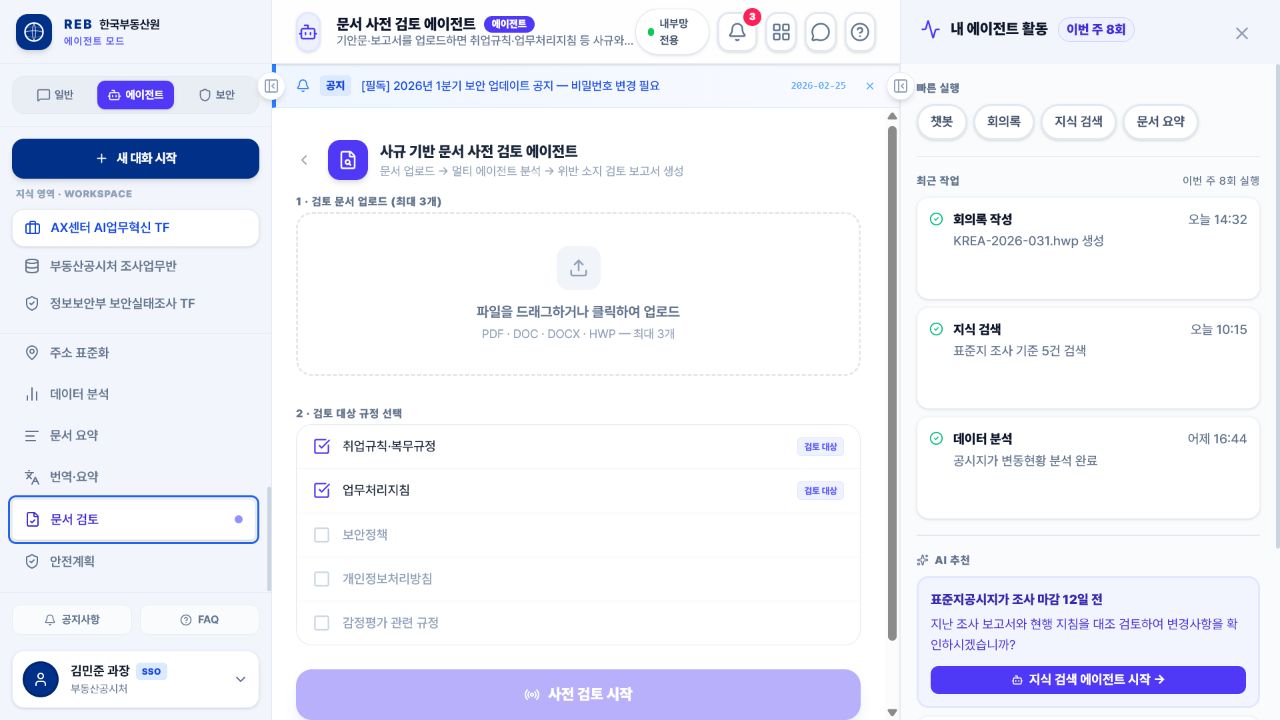
  • Preparing the document PDF, DOCX, HWP and scans converted into something readable
  • Compared with the rules Relevant clauses found in the chosen rules and guidance, and compared
  • Findings sorted Possible breaches and gaps, ordered by severity and by the evidence for each
AgentQ 문서 사전 검토 에이전트에서 문서와 검토 규정을 선택하는 화면
Text2SQL Analytics

Querying data in plain language

No SQL needed — ask the question and it fetches the data and shows it as tables and charts.
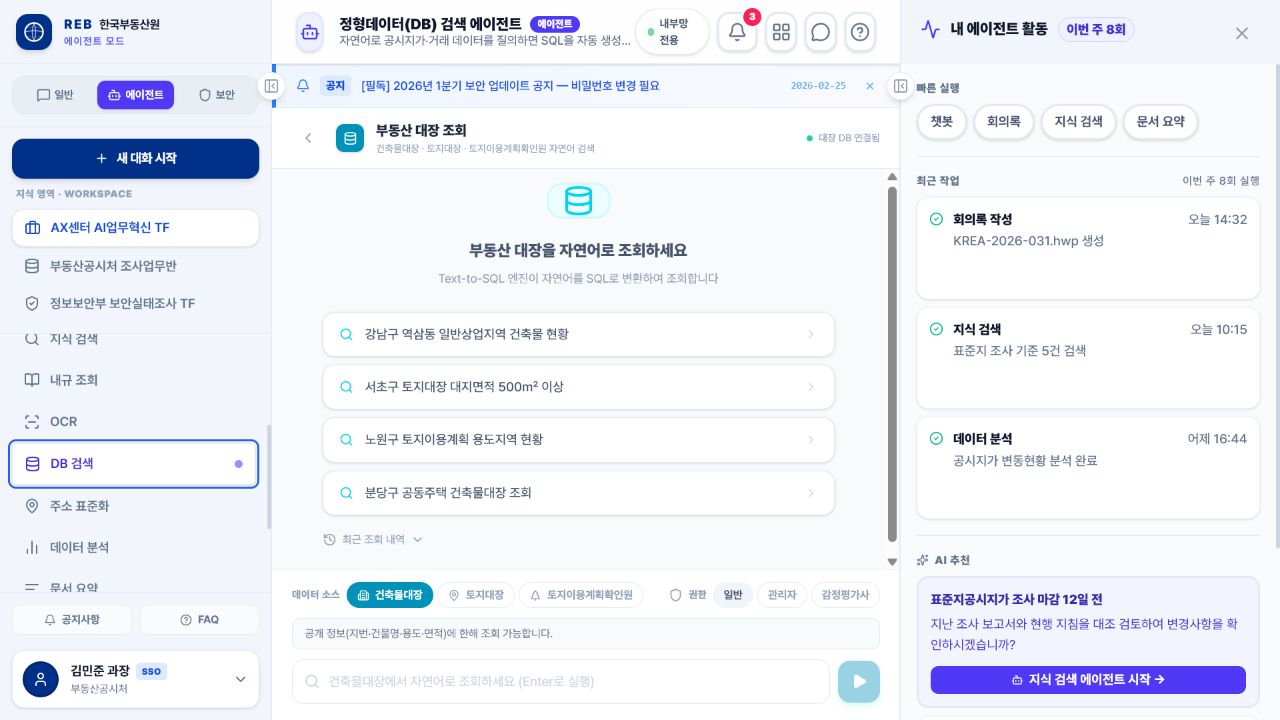
  • Reading the question What to look at and under what conditions, worked out and turned into SQL
  • Within your permissions Only the databases and fields you are allowed to see
  • Results made visible The result and the conditions behind it, as a table, a chart and a short explanation
AgentQ 데이터베이스 검색 에이전트에서 자연어로 데이터를 조회하는 화면
Secure LLM Chat

Secure chat on a local model

Sensitive questions and documents never leave the building — everything runs on a local model inside your network.
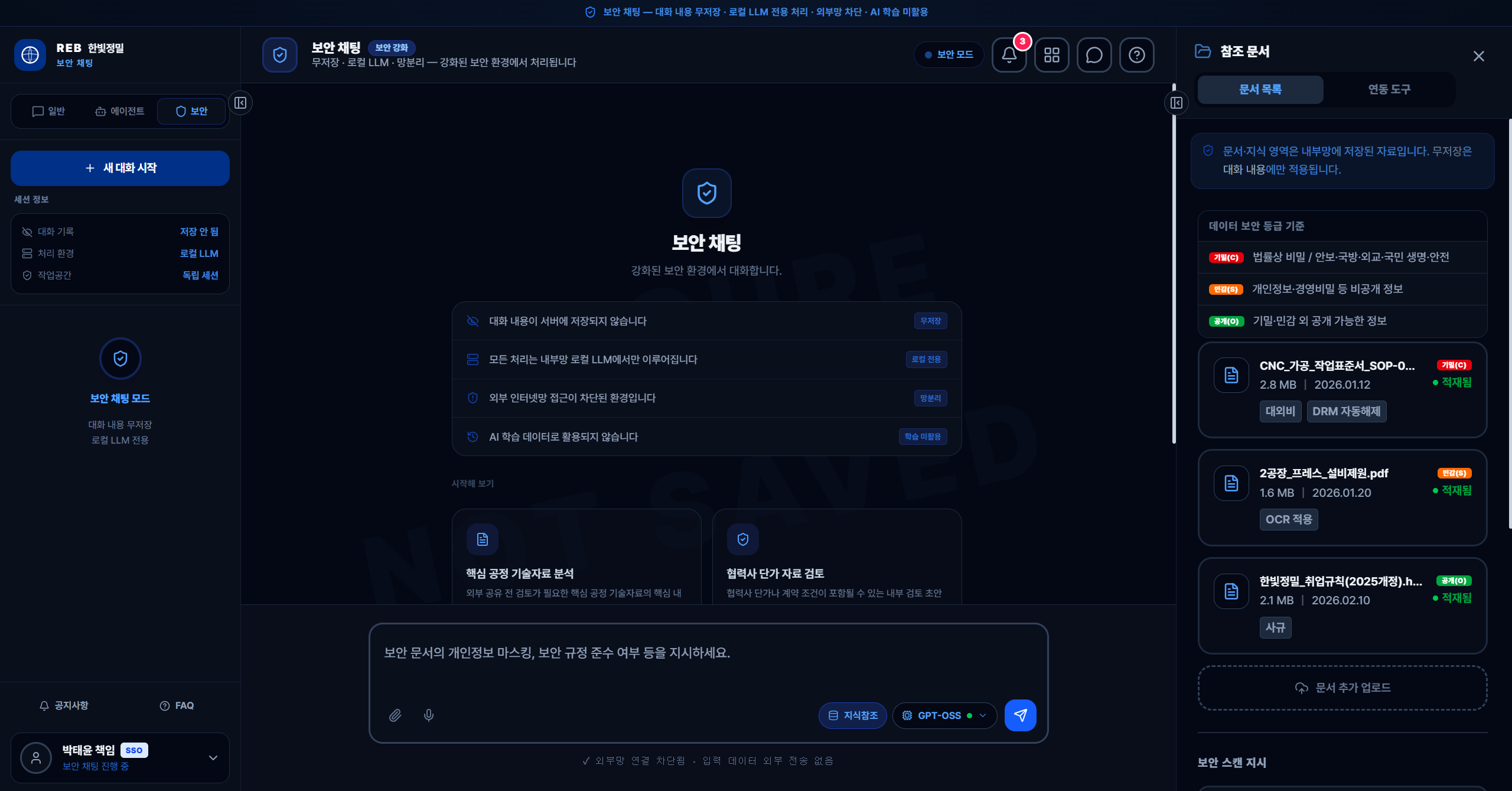
  • Nothing kept Each session stands alone; questions and answers are not stored on the server
  • No outbound connection All reasoning and document handling happens on the internal model
  • Never used for training What you type and what it reads are never used as training data
The flow in detail
AgentQ 보안 채팅에서 대화 무저장과 로컬 LLM 처리 상태를 확인하는 화면
Runtime Pipeline

How raw material becomes something you can review

Documents and data are put in order first; then evidence, reasoning and checking; then the document, the approval and the handover.

STEP 1

Intake

Text, speech, documents, spreadsheets and data queries, all accepted

STEP 2

DRM and OCR preparation

Protected files unlocked and scans read, leaving something searchable

STEP 3

Retrieval

Evidence and sources found across documents, rules and the vector database you are permitted to see

STEP 4

Reasoning on the in-house model

The internal model summarises and analyses for the task, then hands on to the next agent

STEP 5

Checking and security

Whether the evidence matches, how confident it is, personal data and classification — checked, with fixes requested

STEP 6

Document, approval, handover

The official document and the analysis are produced, reviewed, approved and sent on to the business system

Results passed on automaticallyOCR, lookups and analysis from the previous step carry forward — nothing is typed in twice
Permissions held throughoutWhat you may see, and how each document is classified, applies from the first search to the final output

A method to match the material Unstructured documents, structured data and multi-step work each go to the tool and agent that suit them.

Documents and rules · RAG

Finds and combines the closest evidence across internal documents and rules, and shows the source and its classificationalongside it

Tables and figures · Text2SQL

Turns the question into a database query, does the sums, and explains the result with tables, charts and the conditions used

Multi-step work · Multi-agent

OCR, address normalisation, database lookup, analysis and reporting joined up into a single deliverable

Prototype Workflows

Each agent takes its part, and the result comes together

The prototype shows separate capabilities chained in order, producing work a person can then review.

Document review · Appeals

Processing a batch of appeal documents

Input Scanned documents and attachments taken in together

Chain OCR → address normalisation → database lookup → relevant rules

Output A draft review report with the evidence and the points to check

Data validation · Rule review

An unusual-transaction review

Input The transaction conditions and the data to examine are specified

Chain Database lookup → analysis → internal rules and legislation → report

Output A review document setting out the warning signs, the reasoning and what to check next
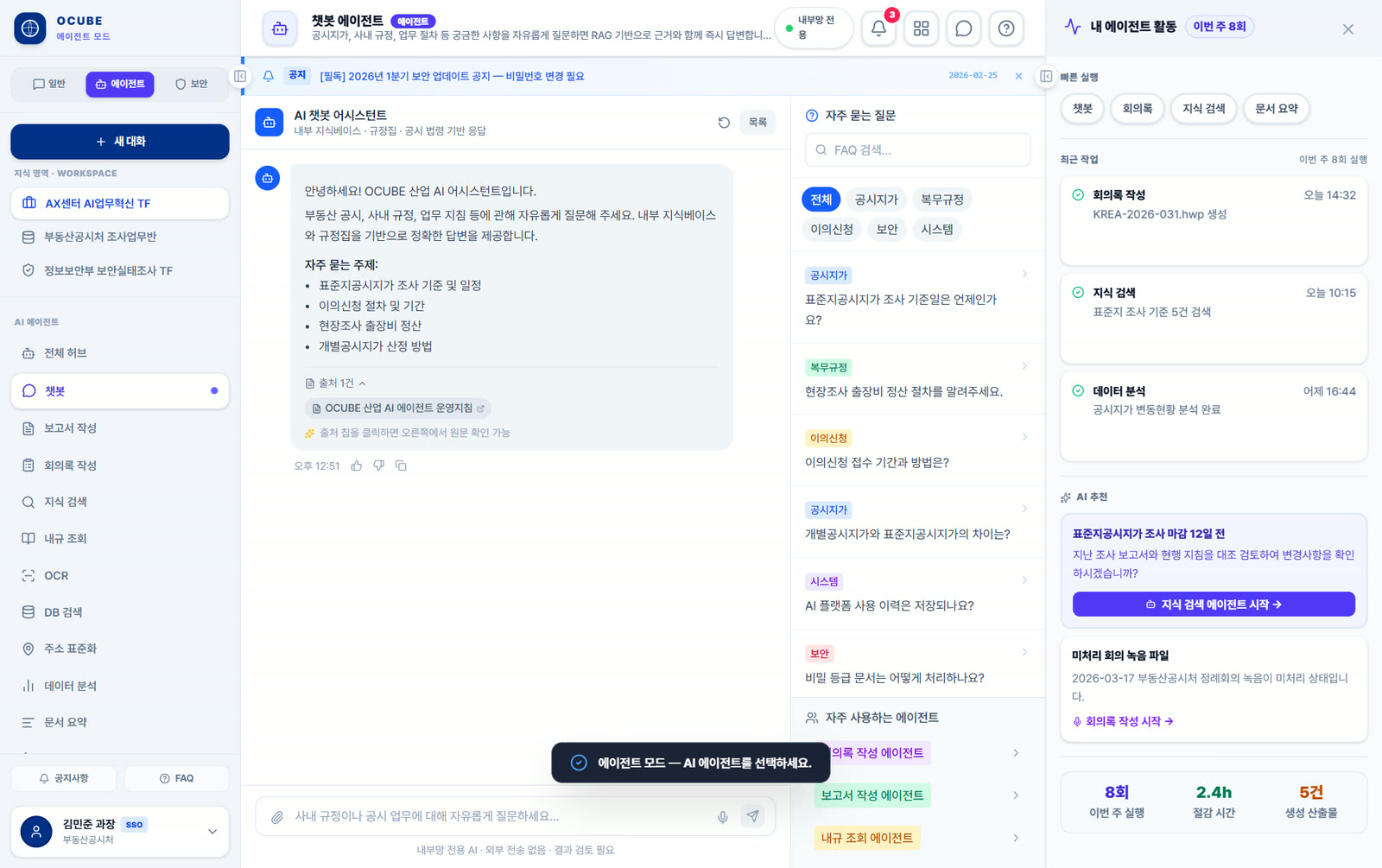
AgentQ 업무 포털 — 근거 출처와 보안 등급을 확인하며 문서·데이터 업무를 처리하는 화면
Ideal Use Cases

Where it makes the most difference

For work where documents, data and rules are tangled together, and the output needs both evidence and control.

Lots of documents, no two alike

Protected files, scans and recordings that must be put in order by text and speech recognitionbefore anything can be searched, summarised or reviewed

Work that must cite the rule it rests on

Finding the internal rule, the law or the guidance, recording the source and comparing it with the document — pre-review and assessment work

Where the same queries come round again and again

Querying databases and spreadsheets in plain language, then producing statistics, outlier checks and chartson top

Multi-step work someone currently retypes

Text recognition, address normalisation, data lookup, rule search and report writing, joined into one workflow across several agents

Where the output has to be an official document

Analysis and evidence written into the set format — report, minutes, review note — and put through approval by the person responsible

Where nothing may leave, and everything must be controlled

Running an in-house small language model and knowledge base, with permissions, classification and usage records held to one consistent standard